6. FTCAN 2.0 and other brands' networks
#Two worlds on the same wire
The VCU talks over CAN in two different ways, and each port works in one of them:
- FTCAN 2.0: FuelTech's protocol, used among FuelTech products (O2 sensors, ignition modules, injector drivers, input expanders, button panels, dataloggers and compatible dashes). Always at 1 Mbit/s, with a 29-bit extended ID.
- RAW mode: raw CAN, without the FuelTech protocol. It is the mode for talking to third-party equipment and to the vehicle's original network, at the rate they use (normally 500 kbit/s or 250 kbit/s) and with the frame format they define.
#How the ID works in FTCAN 2.0
In FTCAN 2.0 the 29-bit ID is not just any number: it says who sent the frame and what type of data is in it.
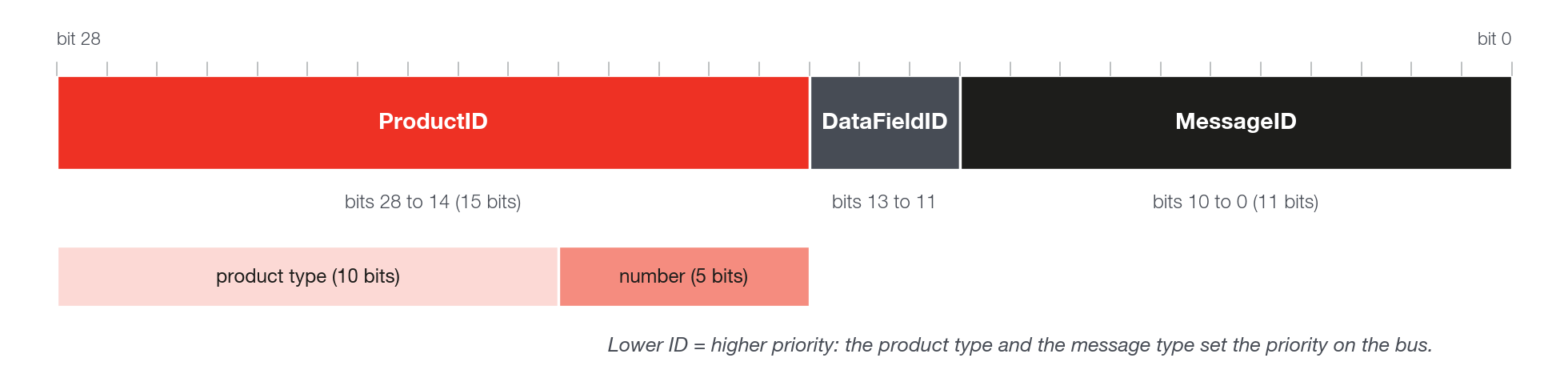
- ProductID (product identification): product type (10 bits) and unit number (5 bits). The protocol can identify up to 32 units of the same product; the VCU reads data from up to 10 FuelTech devices (see CAN Network).
- DataFieldID (data format): simple frame, FTCAN message split across several frames (segmented) or message relayed by a bridge.
- MessageID (message type): real-time readings, commands, responses, configuration.
Messages larger than 8 bytes are split into several frames and reassembled by the receiver. That is why a third-party dash cannot read FTCAN 2.0 with a simple DBC alone, except for fixed-format messages, such as the simplified packets (see CAN custom packages). The complete specification is in the FTCAN 2.0 Protocol document, available on the FuelTech website.
#Golden rule: one protocol per bus
Do not mix the FTCAN 2.0 network with the vehicle network on the same wire pair. They have different rates (1 Mbit/s versus 500 or 250 kbit/s) and IDs that can conflict. Use one port for FuelTech products and another for the vehicle or for third-party equipment.
| Item | Port in FTCAN 2.0 | Port in RAW mode |
|---|---|---|
| Purpose | FuelTech products | Vehicle and third-party equipment |
| Bit rate | 1 Mbit/s, fixed | The bus's own (100 to 1000 kbit/s) |
| CAN FD | No | Yes, on ports that support it |
| ID | 29 bits, structured | 11 or 29 bits, free |
| Features | FuelTech devices, FTCAN real-time data, legacy broadcasts, custom packages, Customizable CAN | Customizable CAN, vehicle functions (transmission, jet ski, PDM, steering wheel...) |