7. VCU CAN ports
#How many ports and what each one supports
| Feature | FT700 | FT470 |
|---|---|---|
| CAN ports | A, B and C | A and B |
| FD mode available on the screen | Ports A and C | Port A |
| Port without FD mode on the screen | B (classic CAN only) | B (in version 3.0) |
| Software-controlled 120 Ω terminator | A, B and C (board revision 1.5 or later) | A and B |
| CAN Sniffer | Yes | Yes (Ports A and B) |
See the CAN_H and CAN_L pinout of each port in the VCU installation manual. On the FT700 with a board revision earlier than 1.5 the terminator is not controlled by the software: check the termination with a multimeter.
#The CAN ports screen
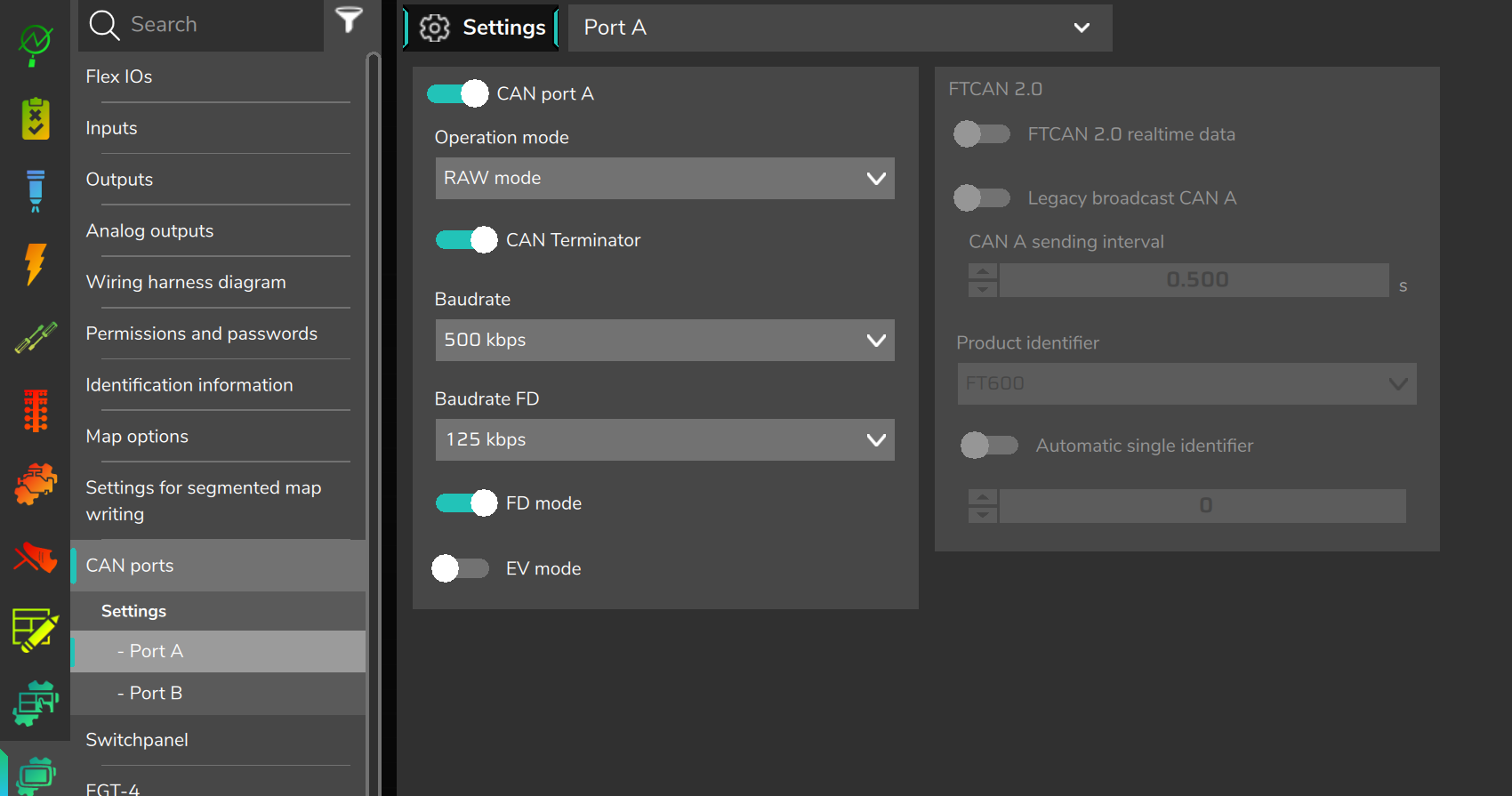
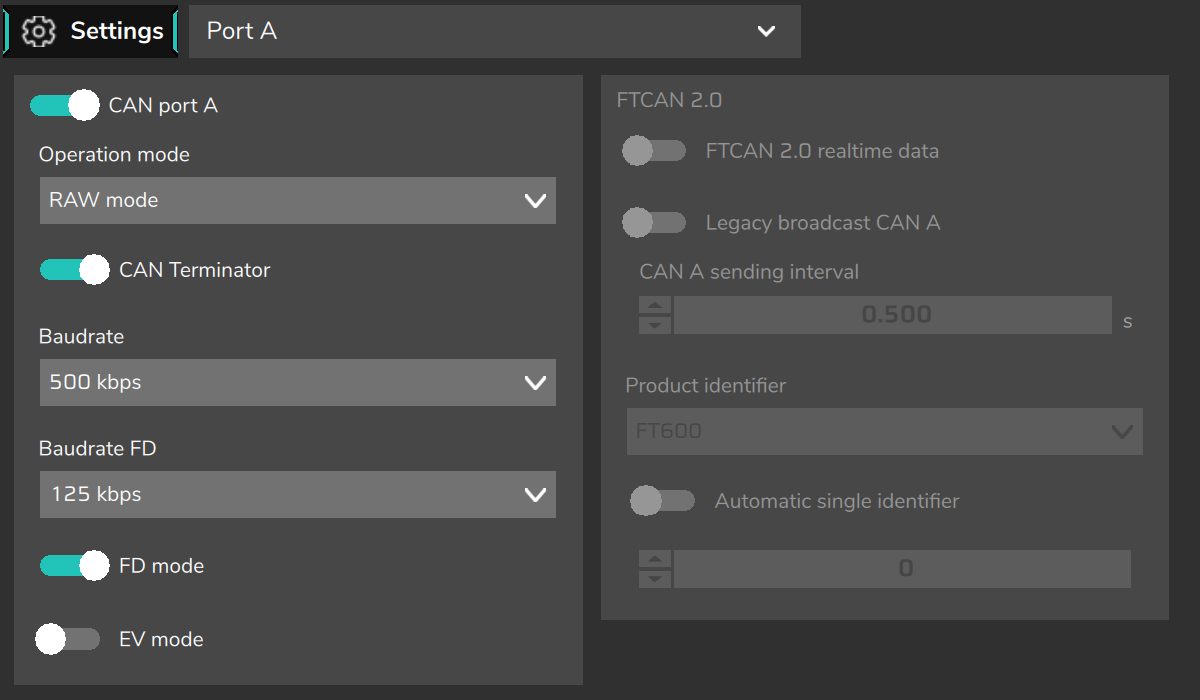
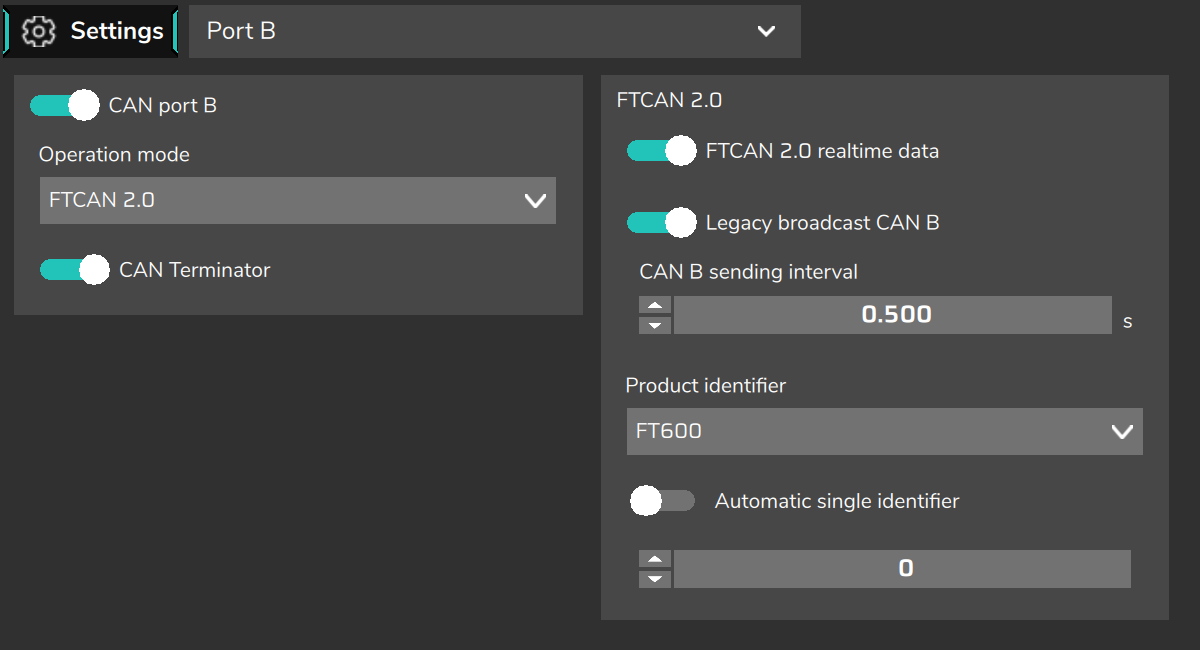
The path is VCU settings > CAN ports (some app messages, such as the map validation, call this menu "My VCU"). Choose the port (Port A, Port B and, on the FT700, Port C) in the CAN ports submenu or in the list at the top of the screen. The screen has two columns: on the left the port configuration, on the right the FTCAN 2.0 group, which is only active when the port is on and in FTCAN 2.0 mode.
| Field | What it does |
|---|---|
| CAN port A/B/C (on/off) | Turns the port on. It is off by default: a port that is off neither transmits nor receives anything. |
| Operation mode | FTCAN 2.0 (default) for FuelTech products or RAW mode for the vehicle and third-party equipment. |
| CAN Terminator | Turns on the VCU's 120 Ω resistor on this port. Turn it on only if the VCU is at one of the two ends of the bus. It is on by default. |
| Baudrate | RAW mode only. Nominal rate: 100, 125, 250, 500 or 1000 kbps (default 1000). In FTCAN 2.0 the rate is always 1000 kbps. |
| FD mode | RAW mode only and on ports that support CAN FD. Allows frames of up to 64 bytes on this port. |
| Baudrate FD | Only with FD mode on. Data-phase rate: 125, 250, 500, 1000, 1500 or 2000 kbps. The default is 125 kbps: adjust it to the equipment's data-phase rate. |
| EV mode | RAW mode only. In version 3.0, it does not change how the port works. |
In the FTCAN 2.0 group:
| Field | What it does |
|---|---|
| FTCAN 2.0 realtime data | The VCU publishes its real-time data on this port, in FTCAN 2.0 format, for dashes and dataloggers that read this protocol. |
| Legacy broadcast CAN A/B/C | The VCU sends 9 fixed-content frames on this port, in the format of the simplified packets of the FuelTech PowerFT line ECUs (see CAN custom packages). |
| CAN A/B/C sending interval | Interval of the legacy broadcasts and of the custom packages on this port, from 0.005 to 60 s (default 0.5 s). |
| Product identifier | Which product the VCU presents itself as on the FTCAN network: FT700, FT600 (default) or FT500. It only changes how the VCU appears on the network; it does not change the VCU itself. Choose the model specified in the documentation of the equipment or dash. |
| Automatic single identifier and Single identifier | The VCU's number on the network (0 to 31). With automatic on, the VCU picks a free number. |
#Bit rates and sample point
To integrate with another piece of equipment, both sides must use the same bit rate and close sample points. The sample points configured in the VCU are:
| Bit rate | Nominal phase (arbitration) | FD data phase |
|---|---|---|
| 100 kbps | 87.6% (86.7% on the classic port) | not offered |
| 125 kbps | 87.5% | 80.0% |
| 250 kbps | 87.5% (86.7% on the classic port) | 87.5% |
| 500 kbps | 80.0% (86.7% on the classic port) | 88.0% |
| 1000 kbps | 87.3% (86.7% on the classic port) | 88.0% |
| 1500 kbps | not used as nominal | 88.0% |
| 2000 kbps | not used as nominal | 80.0% |
The "classic port" is Port B of the FT700, whose controller supports classic CAN only. On the FT470 both ports use the values outside the parentheses, including Port B, even though version 3.0 does not offer FD mode on it.
#FTCAN 2.0 realtime data
With this option on, the VCU publishes its channels in four priority groups: critical (such as engine speed, advance and the 2-step signal) up to 1,000 times per second; high priority (speeds, pressures, O2 sensors, gear) up to 100 times per second; medium priority (temperatures and others) up to 10 times per second; and the channels' measurement units every 2 seconds. Only channels that have an active source are sent.
#How the VCU reacts to port errors
- No acknowledgment (nobody on the bus): the frame is dropped 20 to 30 ms after it is sent; after three failures in a row the port pauses transmission for 1.5 s and tries again. Reception continues normally. In this case the "Communication error - CAN A" notification only appears if the port is checked in the alert described below.
- Bus-off (excessive errors): the port discards what was in the queue, shows the notification "CAN A: Bus error" and recovers on its own.
- Port failure: the VCU restarts the port in about 1 s and shows "Communication error - CAN A", with or without the alert.
In the Alerts > Error in the CAN port menu, check the ports the VCU must watch and choose a single reaction in Alert action: Warning only, Safe mode or Engine shut off. The alert triggers when a watched port cannot transmit (nobody acknowledges the frames) for longer than the Time for validation (how long the failure must last), and only after the delay configured in Delay to start. It watches the port, not each piece of equipment: if another module on the same port keeps acknowledging the frames, the alert does not trigger. Use it on critical ports, such as the injector driver port or the ignition module port.