1. What the function does and when to use it
This guide covers FuelTech Vision (the PC software that configures the VCU) and firmware 00.03.00.55 of the FT700 and FT470 VCUs (FuelTech engine control units).
It is for people who install and tune direct injection engines: tuners, calibrators and technical support staff. This function is intended for competition engines and off-road use.
With the High pressure fuel pump (HPFP) function, the VCU keeps the pressure of the fuel that reaches the injectors at a target. It controls rail pressure (the fuel rail is the high pressure line that feeds the injectors) in closed loop, correcting from the measured pressure, with a target by rpm and load, on 1 or 2 rails.
It drives the pump valve with one pulse per lobe (the camshaft lobe that drives the pump) and publishes to the datalogger what it calculated and what it delivered.
The guide goes from installation to step-by-step tuning, with what to check in the log at each step. The terms are explained in Glossary.
#What the function does
The function controls the rail pressure of a direct injection engine (GDI, gasoline direct injection).
The high pressure pump is mechanical: the camshaft lobes push the pump plunger (the piston).
The VCU does not move the plunger. It commands the pump control valve.
For each lobe, the VCU sends a pulse to that valve.
What the VCU varies is the pulse duration.
The VCU reads rail pressure from a sensor wired to input DI1 or DI2 (DI: direct injection) and compares it with the table target.
With feed-forward on, the VCU calculates the pulse in advance, from injector consumption, and the PID (proportional, integral and derivative controller) only corrects the remaining error: this correction is the trim.
With feed-forward off, the PID commands the whole pulse.
The calculation is in Closed loop and PID and in Feed-forward (physical model) and trim.
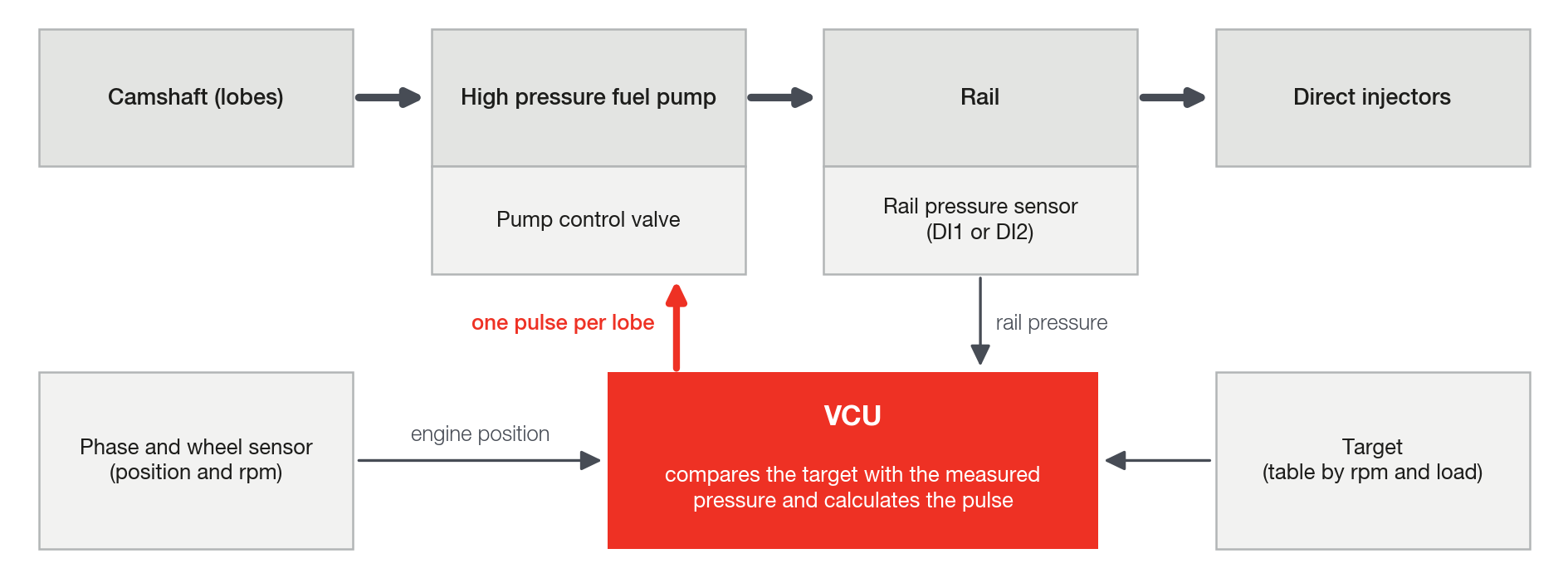
The VCU only sends the pulse. It does not control the valve current: there is no peak or hold current.
The driver and the valve must accept this command.
#One rail or two
The Rails count field has two options: Single rail and Dual rail.
Use Dual rail when the engine has two high pressure pumps, each with its own rail and its own sensor (for example, a V8 with two pumps).
Rail #2 only appears with Dual rail.
Changing Rails count only takes effect after you write the map and power-cycle the VCU (turn it off and back on).
| Per rail (Rail #1 and Rail #2) | Common to both rails |
|---|---|
| Output (Rail #1) and Output (Rail #2) | Rails count |
| Output behavior and Rail pressure sensor reference | Fuel pressure target map: one table and one target for both |
| Feeds bank A, B and C | PID gains: Kp, Ki and Kd (proportional, integral and derivative) |
| Cam dependence | Feed-forward and the curves |
| Number of lobes per cycle and the opening and closing angles of lobe #1 | The Engine start and Protections (guards) groups, the overpressure protections |
| Turns the Low rail pressure injector cut-off on or off (Enable on Rail #1 and Enable on Rail #2) | Injector cut-off rail pressure limit |
The PID trim is calculated separately for each rail.
#When to use
Use the function on a direct injection engine with a mechanical high pressure pump, when the VCU can command the control valve with one pulse per lobe: a single pulse, with no current profile (see Before you start: installation).
#What the function requires
- One VCU output for the valve, assigned before you turn the function on. Without an output the function does not start.
- One rail pressure sensor on DI1 (Rail #1) or DI2 (Rail #2).
- A phase sensor, in addition to the rpm signal. The VCU only drives the valve after the engine is synchronized.
- Direct injection banks marked on each rail.
- Evenly spaced lobes: 1 to 4 lobes per cycle.
The installation (output, sensor, banks) and the checklist are in Before you start: installation.
#When not to use
- Engine without a phase sensor.
- Valve that needs current control (peak and hold) done by the VCU: the function only sends the pulse.
- Pump with unevenly spaced lobes or with more than 4 lobes per cycle: the spacing is fixed at 720 crankshaft degrees ÷ number of lobes.
- When you need Quick start (emulated cam sync): with the function on, the VCU ignores quick start, and FuelTech Vision warns you when it validates the map.
#Where it is on the screen and how to turn it on
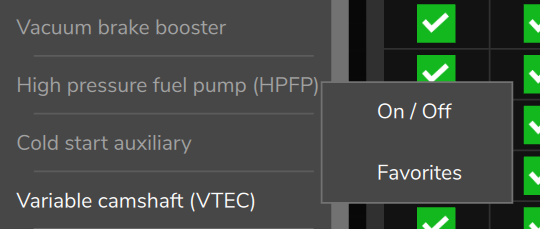
On the PC and on the phone: Other Functions > High pressure fuel pump (HPFP).
On the tablet and on the panels the card shows Functions over Other, on two lines: the path is the same.
The function ships turned off. Press and hold the card and use On / Off.
Tapping the card while it is off shows: To activate or deactivate the function hold pressed.
When you turn the function on or off and write the map, the VCU restarts by itself, with the engine stopped.
#FT700 and FT470
Both VCUs use the same code and the same menu for this function.
The FT470 installation has differences in the outputs, which are Flex IO (each pin can be an output or an input): see Before you start: installation.
#Where to go next
To set up from scratch, follow the order of the guide: How the pump delivers fuel, Before you start: installation, The lobe angles, Pressure target, Closed loop and PID, Feed-forward (physical model) and trim, Cranking and protections and Reading the log.
Before the first start, go through the checklist at the end of Before you start: installation.
Tuning with the engine running is work for a qualified professional (see the warning at the start of this chapter): use Commissioning and tuning step by step. In short:
- Sensor and scale: the last point of the sensor table is the full scale, the highest pressure the VCU can see; engine stopped, stable reading at low-side pressure (the lift pump pressure).
- Protections: Guard 1, Guard 2 and the release level below the full scale of your sensor.
- Output and polarity: feed-forward on (the cranking routine only exists with it); during cranking, duty 100 and pressure rising.
- Sync and window: provisional target and initial gains entered before running the engine; effective window different from 0/0.
- Phase: sweep the window to the smallest pulse that holds the target.
- Target: table filled in, with margin below Guard 1.
- Feed-forward: G(W) curve built up by the trim, with the engine running.
- Fill factor (correction of the model by rpm): only if the trim changes with rpm.
- Gains: Kp and Ki one rpm point at a time, until the error stops cycling.
- Transients and dead time: the t0, the valve dead time, last and on its own.
For a symptom, see Diagnostics: symptoms and causes.
For each field on the screen, see Parameter reference.