5. Pressure target
The pressure target is the pressure the VCU pursues in the rail at each engine operating point.
It comes from a table with rpm in the columns and load in the rows.
This chapter shows how to choose the load, fill in the table and how the VCU reads it.
The calculation that takes the rail to the target is in Closed loop and PID.
#Where it is and which load to use
The table is in the Adjust tab of the High pressure fuel pump (HPFP) function.
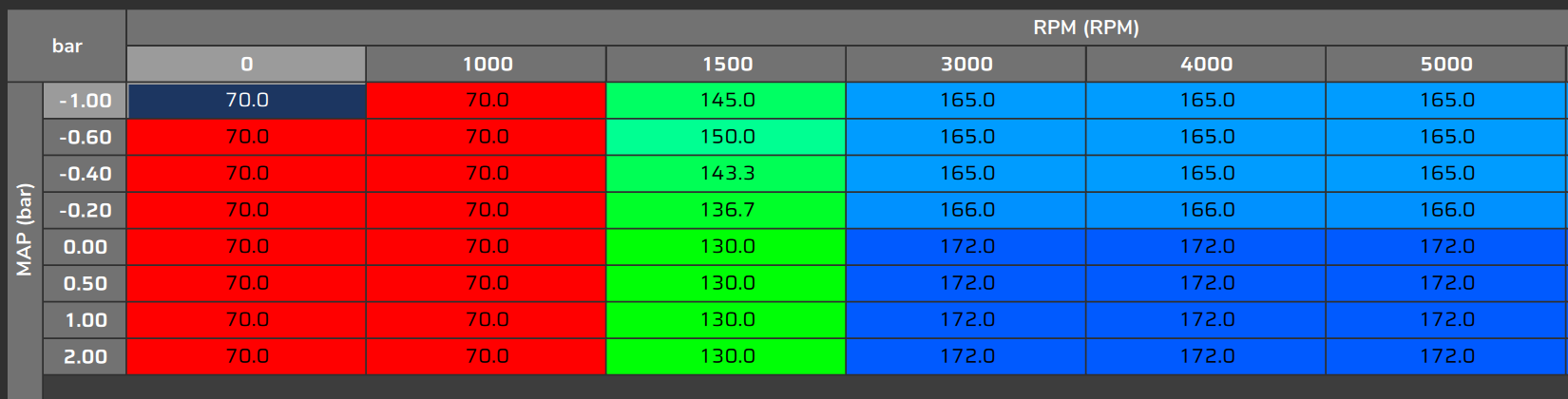
The table title is Fuel pressure target map (MAP) or Fuel pressure target map (TPS), depending on the chosen load.
The choice is made in the Settings tab, General settings page, in the Fuel pressure target map field.
The field has the same name as the table, but it only chooses which load forms its rows.
- TPS (%): throttle position.
- MAP (bar): manifold pressure, in gauge bar (vacuum is negative), the same MAP channel as in the other tables.
Field experience: prefer MAP (bar).
The load that matters to the pump is the real one, and on a turbo engine the TPS does not show it: the engine is already in boost with the throttle still partly open.
FuelTech Vision keeps one table for each load.
Only the table of the chosen load goes to the VCU.
The other stays in the file, with no effect, and one does not copy the values of the other.
Changing the load in Fuel pressure target map requires writing the map: it does not apply live.
#Axes and values
The table is at most 8 × 8.
The new map already comes 8 × 8, with all cells at 0 bar.
| Axis | New map | Range on screen |
|---|---|---|
| Columns: rpm | 0, 1000, 2000, 3000, 4000, 5000, 6000, 8000 rpm | 0 to 16000 rpm |
| Rows: TPS (%) | 0, 15, 30, 45, 60, 75, 90, 100 | 0 to 100 % |
| Rows: MAP (bar) | −0.5; 0; 0.5; 1.0; 1.5; 2.0; 2.5; 3.0 | −1 to 10 bar |
| Cells: target | 0 bar | 0 to 500 bar |
The axes must be increasing.
Between cells the VCU interpolates, in both directions.
Outside the axes the VCU does not extrapolate: the first or the last row or column applies.
Extend the axes to cover the whole rpm and load range the engine uses.
Without a valid rpm signal, the target is 0 bar.
Without a valid TPS or MAP signal, the VCU uses a load equal to zero (TPS 0 % or MAP 0 bar).
A table larger than 8 × 8 loses the last rows and columns, and FuelTech Vision warns you.
The target values appear in the pressure unit chosen in FuelTech Vision; the numbers in this guide are in bar (1 bar = 14.5 psi): check the unit shown next to each field before typing a value.
#How the screen shows the table
The screen shows rpm in the columns and load (TPS or MAP) in the rows.
The table tools Switch axis and Descending rows change how it is displayed.
If someone used them on this map, check the row and column headers before typing.
The operating point marker on the table follows the engine rpm and load.
It shows the instantaneous values, and with feed-forward on the VCU reads the table with smoothed values: the target can lag behind the marker.
#Target smoothing (only with feed-forward)
Without feed-forward the target follows the table directly, with the rpm and load of the moment.
With Enable feedforward (PID as trim) on, the VCU smooths the target.
The rpm and load axes go through a filter of about 0.16 s: the target rises with this small delay.
The fall is slower: the target drops following a curve with a time constant of about 1 s.
Calculated estimate, not measured: from 150 to 60 bar, the target goes through about 93 bar at 1 s, 72 bar at 2 s and 65 bar at 3 s.
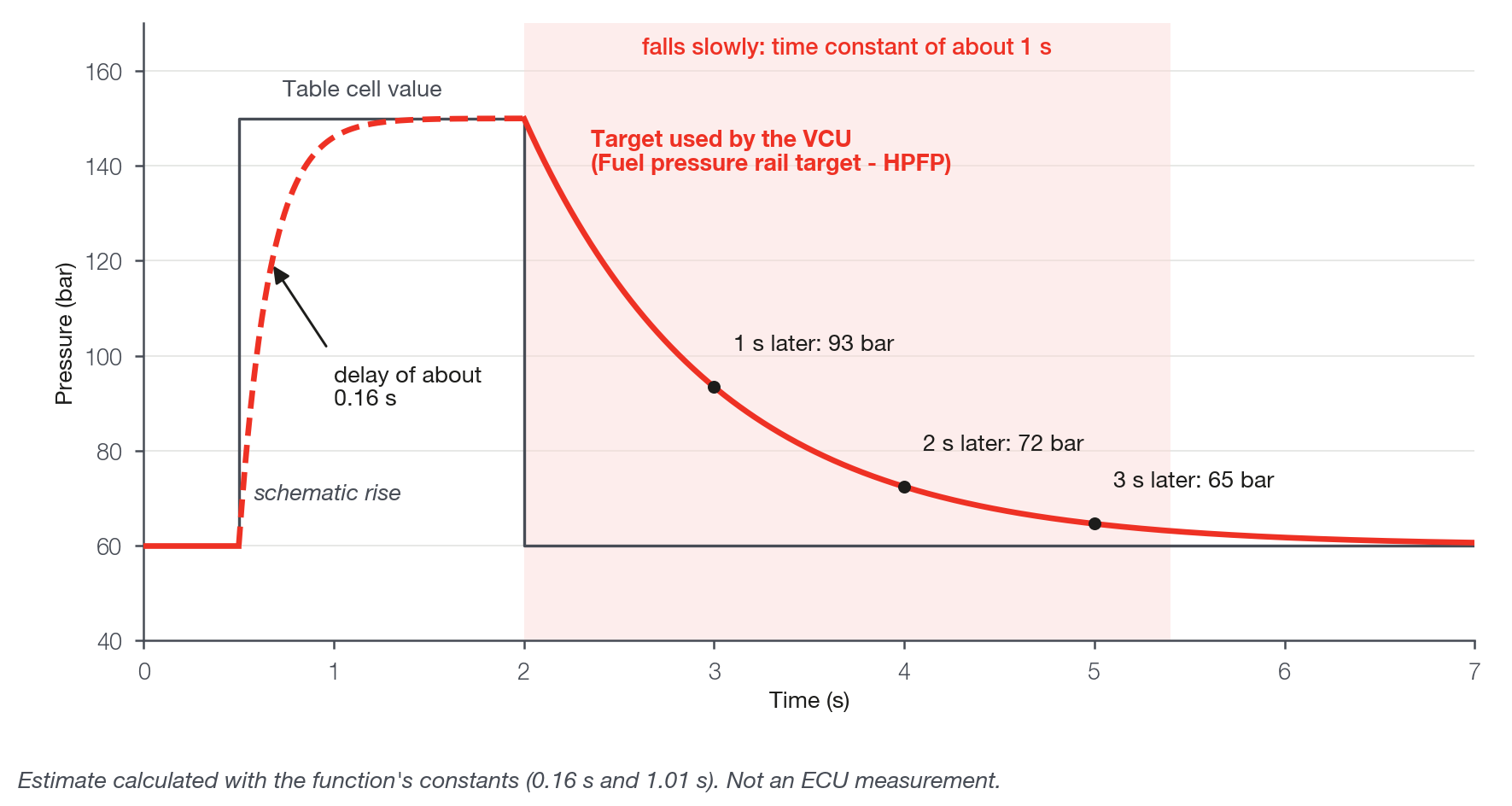
There is no screen setting for this smoothing.
The Fuel pressure rail target - HPFP channel shows the already smoothed target, the same one the loop uses. It is not the raw table cell.
It is a single channel for both rails.
When comparing the log with the table, expect to see the target lagging on the way down.
#Two rails and live editing
With 2 rails there is a single target table and a single smoothing.
Each rail compares this target with the reading of its own sensor.
With the VCU connected, each edited cell goes to the VCU immediately.
With feed-forward on, a cell edited to a lower value appears in the target channel with the smoothed fall.
#How to choose the values
Field experience: define each cell by the pressure the pump can sustain with the consumption of that condition.
Do not use the pressure the rail holds by itself in deceleration, with no pump pulse: it changes from day to day and with the state of the engine.