10. Self-learning: VE learning (LTFT)
This chapter covers the long term learning (LTFT), which works together with the VE closed loop. The acceleration fuel enrichment of VE mode is in Enrichments and compensations in VE mode.
The self-learning does not change your map. It stores, in the VCU memory, a separate correction table. Taking this correction to the VE table is your decision, on the VE learning (LTFT) screen.
#What the long term learning learns
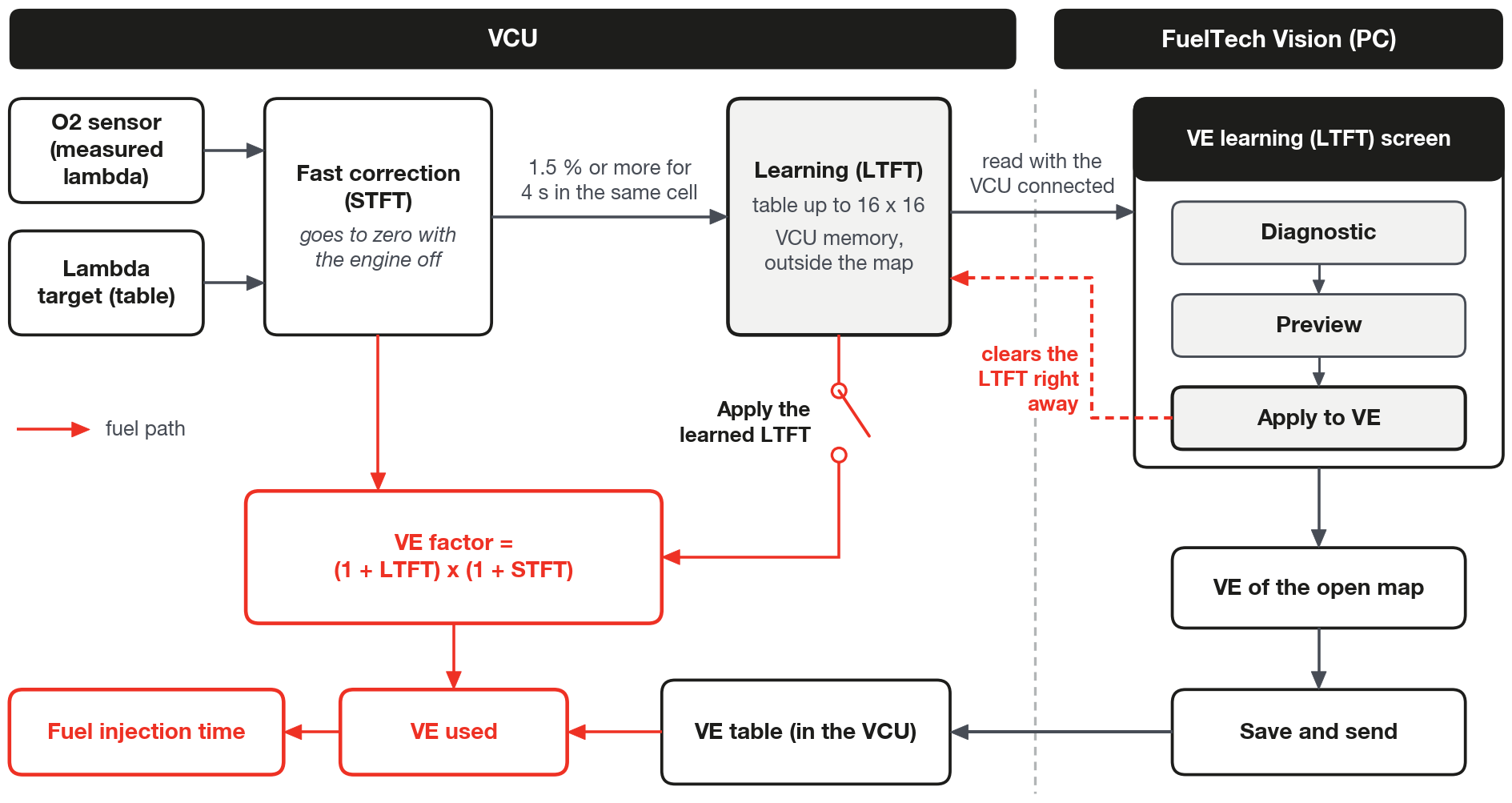
The VE mode loop has two layers. The fast correction (STFT) corrects the O2 sensor error now and returns to zero with the engine stopped; it, the conditions in which it acts and the authority limits are in VE closed loop. The long term learning (LTFT) stores, cell by cell, the stable part of this correction.
The LTFT learns from the fast correction, not from the O2 sensor. When the fast correction stays above a threshold for a few seconds, with the engine in the same map region, the LTFT absorbs a part of it.
It is a single table for the whole engine, of up to 16 × 16 cells, with its own RPM and MAP axes. There is no separate learning per bank.
Each cell stores three numbers: the correction in %, the confidence in hits (how many times the cell has learned) and the average air temperature when it learned, used only for diagnosis.
#The axes of the learned table
The axes are copied from the main VE table that is in the VCU at the moment the learning is zeroed.
- VE with up to 16 points per axis: the learning uses the same points.
- VE with more than 16 points: 16 evenly spaced points, always with the two ends. A 32 × 32 VE becomes 16 × 16.
- Missing or invalid VE: default axis from 500 to 8000 rpm and from −0.8 to 2.0 bar (gauge).
Between one clearing and the next, changing the VE (values or axis sizes) does not change the learning axes. That is why the order of clearing matters: see The right order to clear the learning, in this chapter.
#How a cell learns
The active cell is the table cell closest to the point where the engine is. The learning happens by transfers.
A transfer happens when the fast correction stays at 1.5% or more, positive or negative, without interruption for 4 s, with the engine in the same active cell. After each transfer the 4 s count starts again.
Changing the active cell zeroes the count. After the change, the learning is blocked for one O2 sensor delay plus 0.3 s.
Each transfer moves a fraction of the fast correction to the LTFT. The fraction depends on the MAP and comes from the Learning speed by MAP table:
| MAP (bar, gauge) | Fraction moved per transfer (factory) |
|---|---|
| −0.8 and −0.6 | 30% |
| −0.4 | 40% |
| −0.2 and 0.0 | 50% |
| 0.5 | 30% |
| 1.0 and 2.0 | 0% |
With the factory default the table does not learn with the engine at 1.0 bar or above. Between 0.5 and 1.0 bar it learns more and more slowly: at 0.75 bar, at half the speed (15%).
Away from the exact axis point, the transfer is divided among the four surrounding cells, by the weight of each one, as in the table interpolation.
Each cell behaves like an average. The step enters whole in the first transfer, by half in the second, by a third in the third; from 19 hits on, each new transfer enters with 5%. A cell with many hits is stable and changes little.
Each cell stays within ±15% (LTFT limit per cell). The fast correction and the learning together stay within ±25% (Total authority (STFT + LTFT)).
An error smaller than the threshold is not learned. The threshold is Minimum STFT to transfer to LTFT (1.5%, range from 0 to 10%) and the time is Stable time in cell to transfer (4 s, range from 0.5 to 30 s).
In practice the mixture error needs to be a little larger. The dead band of the fast correction (0.7%) adds to the threshold: by calculation, the effective threshold is between 1.5% and 2.2%, depending on the O2 sensor noise.
The error is measured against the target of the lambda table, without the enrichments. A steady-state enrichment that is on in the range where the loop acts (gear, engine temperature, air conditioning) appears as error, the loop removes it up to the authority and the learning records it in the cell. See Enrichments and compensations in VE mode.
The Rich bias in learning switch (off by default) makes the table learn the Rich bias (3% by default) more than the engine needs.
With the LTFT applied, the fast correction goes negative to compensate for the bias. When it goes to zero (invalid O2 sensor, RPM below the loop minimum, start and post-start), the engine runs richer by the value of the bias.
#When the learning does not happen
Everything that freezes the fast correction also blocks the learning: cold engine, start and post-start, cut, transient, invalid O2 sensor and the other conditions of VE closed loop.
The locks below let the fast correction act, but block the learning. In the Conditions (gates) list of the screen they appear in yellow, with these names:
| Lock on the screen | When it blocks (factory default) |
|---|---|
| VE model sensor in failsafe | MAP without a valid reading or Use MAP sensor off; air temperature and fuel pressure without a reading only count if the use of the sensor is on in the VE model |
| Differential pressure out of tolerance | differential pressure more than 10% away from the injector rated pressure (Differential pressure tolerance for learning); only with the pressure sensor enabled and outside direct injection |
| Air temperature out of range | air outside 30 ± 15 °C: it only learns between 15 and 45 °C (VE reference air temperature, Air temperature range for learning) |
| Ethanol changing | ethanol changes more than 2% in 10 s (Ethanol change that blocks learning); only with flex compensation active |
| Battery voltage out of range | battery below 10.5 V or above 15.0 V |
| STFT saturated for too long | fast correction at the limit for more than 30 s |
| Cell changed less than one delay ago | wait of one O2 sensor delay plus 0.3 s after each cell change |
| Waiting for STFT to stabilize | 4 s count not yet complete, or fast correction below the threshold |
| Lambda target moving | the target changed and the change has not reached the O2 sensor yet |
| Saving to memory | the VCU is saving the table |
| Residual acceleration fuel enrichment | remainder of acceleration fuel enrichment below the value that freezes the correction, and for one more O2 sensor delay plus 0.3 s; only appears with Minimum acceleration fuel enrichment that freezes the correction above 0 |
The air temperature lock looks at the air sensor reading even if it is disabled in the VE model. With the sensor installed and reading, air outside 15 to 45 °C stops the learning.
In a cell that is already right, Waiting for STFT to stabilize and the Correcting (waiting for cell to stabilize) state stay on all the time, because the correction never reaches the threshold. This cell needs nothing more.
Total authority reached appears in red in the list, but freezes nothing: it only warns that the factor reached the ±25% limit.
#Where the learning is stored and when it is saved
The learned table is kept in a dedicated area of the VCU memory, separate from the map. It does not go inside the map file: saving or opening a map neither takes nor brings learning.
On power-up, the VCU loads the last saved table and the screen shows Memory: Restored. Without a valid table, it shows Empty and the learning starts again from zero, with the axes of the VE that is in the VCU.
The VCU saves the table in four situations:
- With the engine stopped for 2 s, once per stop, if something changed.
- When the sum of the changes of all the cells, not of a single one, goes over Accumulated change that requests a save (2%) and the Minimum interval between memory saves (60 s) has already passed since the last one.
- On the Save now button.
- Right after Clear LTFT.
Saving when the engine stops needs the VCU on during those 2 s. After a learning session, stop the engine and wait a few seconds before turning off the key, or use Save now with the VCU connected.
By the accumulated change, at the default, the memory is rewritten at most once per minute, and only while the table is changing. Do not reduce the Minimum interval between memory saves without a reason: with 10 s, the memory wears out up to six times faster.
What erases the learning: the Clear LTFT button, the Apply to VE button and the Restore factory defaults of FuelTech Vision, which zeroes the learning before restoring.
Sending another map, turning off the loop or leaving VE mode do not erase the learning.
After a firmware update, check the Memory indicator on the learning screen before counting on the old table.
#Applying the learned LTFT
Learning and applying are different switches, both in the Fuel closed loop (VE) function.
- Long term learning (LTFT) (on by default): lets the table learn.
- Apply the learned LTFT (off by default): makes the table correct the fuel.
With Apply the learned LTFT off, the table only observes. The fast correction keeps carrying the whole correction and the LTFT follows the value it asks for; the VE closed loop - Active LTFT channel stays at zero, and the learned table only appears on the screen, with the VCU connected.
With the switch on, the LTFT of the point enters live on top of the VE from the table, before the injection time is calculated. The VE table of the map does not change.
The LTFT enters the VE factor together with the fast correction, by the formula in VE closed loop: with the factory authority the factor stays between 0.75 and 1.25, in the VE closed loop - VE factor channel.
On, each transfer passes to the LTFT the same value it takes from the fast correction, practically without changing the fuel at that instant. Over time the LTFT takes over the correction and the fast correction drops below the threshold.
The applied LTFT is a table correction, not a loop correction. With the Fuel closed loop (VE) function on, it always applies whenever the pulse comes out of the VE model, including with a cold engine, in post-start and below the loop minimum RPM. With the function off, the LTFT is not applied either.
Turning the switch on with the engine running causes no step: the fast correction yields, at the same instant, the value of the LTFT at that point.
Turning it off causes a step: the LTFT drops out of the fuel at once and the fast correction has to make up the difference. Change this switch at idle or with the engine stopped.
The two switches take effect immediately, without restarting the VCU.
Even with the switch off, the table guides the fast correction. When it is frozen and the engine moves away by one cell, it is taken to the value the learning recorded at the new point (63% in 1 s, 95% in 3 s). With the switch on, the destination is zero. With Rich bias in learning on, the destination subtracts the bias in both cases.
In FuelTech Vision on the computer, Apply the learned LTFT is grayed out when Long term learning (LTFT) is off. On the VCU screen the two switches are independent, and the VCU applies the table even without learning.
#The VE learning (LTFT) screen
On the computer, the screen is in the Tools > VE learning (LTFT) menu. It only appears with the map in VE mode and only works with the VCU connected (tooltip Requires a connected VCU).
On the VCU screen, it is in the Fuel injection menu, right below Fuel closed loop (VE).
The screen has three pages, chosen on the selector in the panel: Live, Diagnostic and Commit to VE.
#Live page
The heat map shows the LTFT of each cell, with RPM in the rows and MAP in the columns. Green is a cell enriching (VE low there); red, leaning out (VE high). The color scale goes from −15% to +15%.
The opacity shows the confidence: the color is solid when the cell reaches the Minimum confidence (hits) and fades below that. Gray is a cell with zero hits. The golden border marks the active cell. Click (or tap) the cell to see the value and the hits.
Beside it are the state, STFT, Active LTFT, VE factor, Estimated delay, Active cell, LTFT applied (Yes or No (learning only)), Memory (Saving..., Restored or Empty) and the Conditions (gates) list: green free, red freezes the correction, yellow only blocks learning.
The footer shows Table #N · slot seq N · last save N s ago. Each save to memory makes the slot seq rise.
The axes and messages on the screen always use bar for the MAP, even with another pressure unit chosen in FuelTech Vision.
The hits count transfers, not passes of the engine through the cell: a cell that has been run a lot and is already right stays gray, with zero hits.
#Diagnostic page
Before taking the learning to the VE, check that the error really is from the VE. Set the Minimum confidence (hits) (1 to 200, default 20) and click Analyze.
Only cells with hits equal to or above the minimum are included, and at least 4 are needed. With fewer, the screen warns Few cells with confidence and the diagnosis is not valid.
The Minimum confidence (hits) on this page also applies to the Preview, to the Commit and to the color of the Live page. The Commit to VE page does not show this number.
| Test on the screen | What it points to | When it flags |
|---|---|---|
| Global error (flow / pressure / stoich) | error common to the whole engine: injector flow, fuel pressure or stoichiometric | average above 3% with dispersion below 2% |
| Deadtime (correlation with 1/PW) | injector deadtime: the error grows when the pulse gets shorter | R² above 0.5 and slope above 1 |
| Charge temperature (correlation with IAT) | error that follows the air temperature | R² above 0.5 and more than 0.1% per °C |
| Idle only (additive: leak / reversion / O2 sensor) | error only at idle: vacuum leak, reversion in the exhaust or O2 sensor position | up to 1500 rpm and up to −0.3 bar, average above 3%, rest below 1% |
On the screen, PW is the injection time and IAT is the intake air temperature. The thresholds apply in both directions, positive or negative.
With Remove the explained components from the residual on (default), the residual is the LTFT minus each component that the test flagged. It is the residual that goes to the VE.
The Idle only test only warns: it is not subtracted from the residual, even with the box on. If it flags, do not take the idle cells to the VE; look for the leak, the reversion or the O2 sensor.
If it flags Global error, correct the injector flow, the pressure or the fuel before touching the VE (see Before you start: engine, fuel, injectors and sensors).
A positive average LTFT means fuel is missing in the whole engine. How to correct the flow from the global error, and how to use the factor the message shows, is in Diagnosis: symptoms and causes.
#Commit to VE page
The page takes the residual to the VE table of the map open in FuelTech Vision. It has Percentage to apply (0 to 100%, steps of 5, default 50%), Smooth with the neighboring cells (default off), Preview and Apply to VE.
new VE = current VE x (1 + residual x percentage to apply)The residual is carried from the learning axes to the VE axes, by RPM and MAP. A VE cell only changes if all the learning cells around it have the minimum confidence.
Outside the range covered by the learning nothing changes, a change smaller than 0.05% is ignored and the result respects the minimum and maximum of the table.
With a VE of up to 16 × 16 and the learning zeroed after sending that VE, each VE cell depends on a single learning cell. With a 32 × 32 VE, three out of four VE cells depend on two or four, and all of them need to have confidence.
Smooth with the neighboring cells makes a 3 × 3 average only among reliable cells. It does not save a cell without confidence.
Without running the Diagnostic, the Preview uses the raw LTFT, with nothing subtracted.
The Preview shows N VE cells changed · largest change N %. With zero cells, Apply to VE is disabled.
Apply to VE writes the cells into the VE of the open map and, right after, clears the whole learning in the VCU, including the cells that were left out of the preview. There is no confirmation prompt.
The message is Applied to the map. Review the VE table and save/send it to the ECU. The LTFT has been cleared. The Undo gives the VE back, but does not give the learning back: the clear has already reached the VCU.
What each button on the screen does, and does not do, is summarized in Parameter reference.
#The right order to clear the learning
Clearing copies the axes of the VE that is in the VCU at that moment. That is why the order is always this:
- Take the useful learning to the VE with Apply to VE, with the map that is in the VCU open. The Apply already clears the table.
- Make the changes: VE, axes, injector or pressure.
- Save and send the map to the VCU.
- Only then click Clear LTFT.
Clearing before sending leaves the learning with the axes of the old VE. Not clearing leaves the old learning correcting the new VE (with Apply the learned LTFT on) or entering the next Commit.
A new or converted map follows the same rule: send and clear before the first run (see From the pulsewidth map to VE).
#How long to run and what to do with a cell that does not qualify
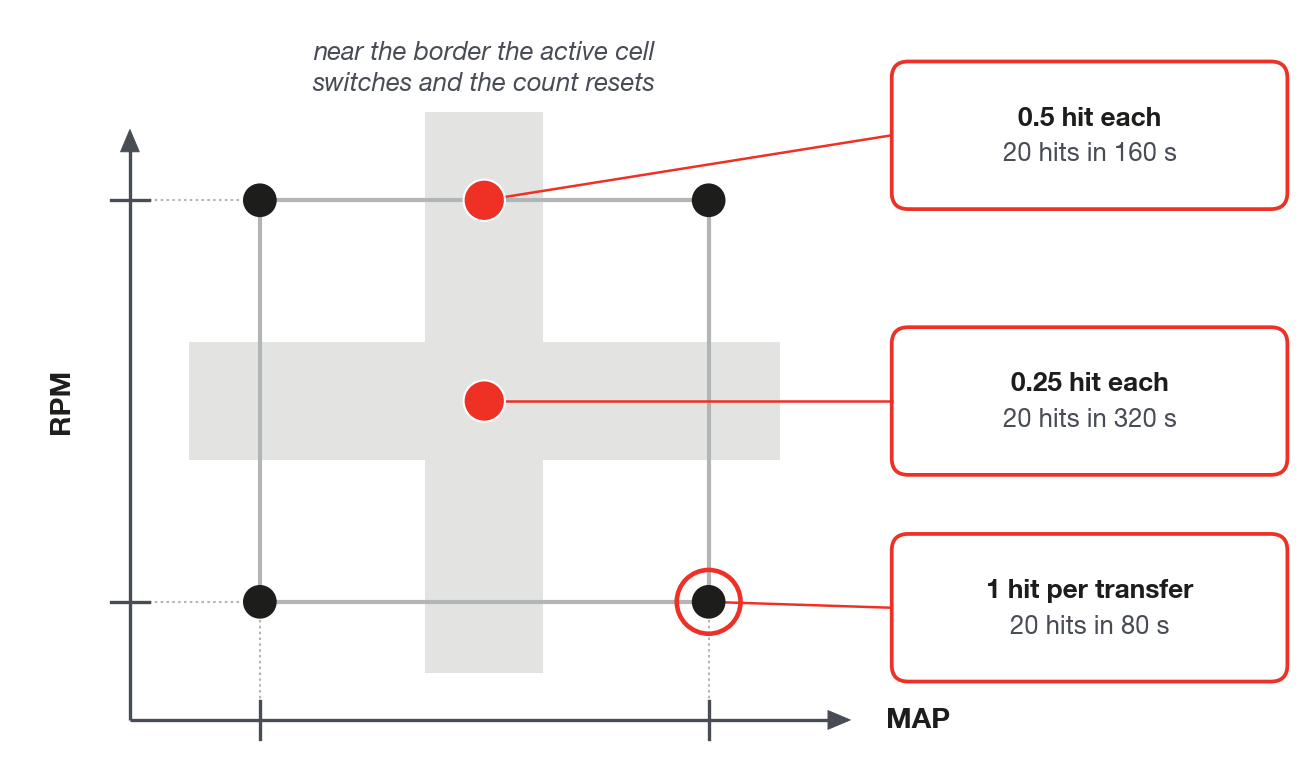
Each cell needs 20 hits, by default, to enter the Commit. A hit is a transfer: 4 s in a row in the same cell with the fast correction at 1.5% or more.
Minimum count: 20 × 4 s = 80 s on each cell, in segments of at least 4 s. A shorter segment does not count.
Halfway between two cells, each one gains half a hit per transfer: 160 s for 20 hits. At the center of four, a quarter of a hit: 320 s.
Hold the operating point near the RPM and the MAP of the cell (the axis number), not halfway between two. Near the boundary the active cell keeps switching, and each switch zeroes the count.
Plan the time: 30 idle and cruise cells need at least 40 minutes of steady state on them.
By calculation, with 20 hits the table holds about 87% of the error at cruise (near 0 bar) and 69% at idle (−0.6 bar and lower). A 50% Commit takes about 44% and 34% of the error to the VE.
By the same calculation, taking an error of 10% to less than 2% through the Commit alone takes 3 rounds at cruise and 4 at idle. Each round (run, Commit, send) starts the count again from zero: a large error is corrected by hand, from the log, and the Commit is the finishing touch (see Step-by-step tuning method).
Lowering the Minimum confidence (hits) shortens the collection, but the table holds less of the error: with 5 hits, about 75% at cruise and 53% at idle.
A pale cell after a lot of running may already be right: an error below 1.5 to 2.2% generates no hit. Confirm with the engine on it: the fast correction stays near zero. This cell does not need a Commit.
Two cases that the collection does not solve, at the default:
- Boost of 0.5 bar and above: with the engine at 1.0 bar or more the learning speed is zero, and between 0.5 and 1.0 bar it falls to zero. In this range the cell gains hits all the same, but keeps less and less of the error: by calculation, with 20 hits, about 69% at 0.5 bar, 43% at 0.75 bar and 20% at 0.9 bar. Tune the boost from the log, by hand.
- Regions where the VE is more wrong than the authority of the fast correction: the STFT saturated (VE probably wrong) state appears and the learning stops after 30 s at the limit; collecting with Apply the learned LTFT off, the table keeps less than the real error. Correct by hand first.
A cell that does not qualify stays as it is in the Commit. Its VE only changes by hand (see Step-by-step tuning method).
The log does not show the hits or the learned table. To know whether a cell qualifies, look at the Live page with the VCU connected: solid color qualifies, and a tap shows the hits.
Recommended practice: do the Commit with the engine off and the VCU on, save a new version of the map and send it before starting the engine.
The reason: with the engine running, the VCU zeroes the learning at the click and goes back to learning against the old VE, which stays in the VCU until the send. The first hits of the next round are born contaminated.
#Fast correction, learning and acceleration fuel enrichment side by side
| Item | Fast correction (STFT) | Learning (LTFT) | Acceleration fuel enrichment and decay |
|---|---|---|---|
| What it does | corrects the O2 sensor error now | stores per cell the stable part of the fast correction | anticipates fuel when the pedal is pressed and removes it on lift-off |
| Reacts to | O2 sensor against the lambda target | fast correction of 1.5% or more for 4 s in the same cell | TPS or pedal speed |
| Horizon | seconds | from one session to another | tenths of a second |
| Where it lives | only in operation; goes to zero with the engine stopped | VCU memory, outside the map | table in the map; stores nothing |
| Factory limit | ±10% in vacuum; +5% and −3% from 1 bar up | ±15% per cell; ±25% together with the fast correction | what the table asks for, in % of the base fuel |
| In the log | VE closed loop - STFT | VE closed loop - Active LTFT (only with the LTFT applied) | VE - Total enrichment (sum) |
| When to use | whenever the loop is on | always learn; apply only with the VE close to right | always in VE mode |
| Risk | hiding a bad VE inside the limit | recording a steady-state enrichment; old learning correcting a new map | each firing freezes the correction and stops the learning for a moment |