1. Introduction
This guide teaches how to create custom functions on the VCU, the FuelTech control unit installed in the vehicle (FT700 and FT470 models; some screens and messages call it ECU). The function is drawn in FuelTech Vision, the FuelTech software that configures the VCU; the custom function editor is in the desktop version.
A custom function is a program that you draw instead of writing. The drawing is made of blocks connected by links: each block does one task (read a measurement from the VCU, compare, add, filter, drive an output) and each link carries the result of one block to the input of another. One output can feed several inputs; each input accepts only one link.
The set of blocks and links of a function is the graph: the math term for points connected by lines. You draw the graph in FuelTech Vision, it is stored inside the map and the VCU runs it by itself, in cycles of about 1 ms. Each map has 10 slots, from Custom function 1 to Custom function 10.
#What it is for
You choose which VCU measurements come in, what calculation to do with them and what comes out: a physical output or an action on ignition, injection, cut and electronic throttle. Examples of what a custom function does (the chapter Examples has complete cases):
- Fan by temperature: turns on above one value and off below another, without repeatedly turning on and off around the point.
- Output by RPM and throttle: activates an output only when both the RPM and the throttle opening go above a value.
- Acceleration enrichment: injects extra fuel when the pedal is pressed down, proportional to the speed at which the throttle opens.
- Solenoid current control: holds the current of a proportional coil at the requested value, through a PWM output (which turns on and off many times per second).
- Timed pulse: activates an output once, for a fixed time, after launch conditions.
- Deceleration fuel cut: cuts injection when you lift off the pedal while moving and brings it back smoothly, with help from the ignition.
- Idle control: holds the idle speed with two actuators: the ignition and the airflow through the electronic throttle.
For an electric vehicle (EV), the VCU action block has two actions on the electric motor torque target (the VCU action sheet, in the chapter Output blocks). Integration of the inverter, the battery management and the charger is outside the scope of this guide.
#What you need
- FuelTech Vision 3.0 and firmware 00.03.00.01 (the firmware is the program that runs inside the VCU). The FT700 and the FT470 use this same firmware version, and the Custom functions menu does not filter by VCU. The number of physical inputs and outputs changes from one VCU to another. On the FT470, the measurements Analog input #28: Voltage to Analog input #36: Voltage always read 0.
- A map loaded in FuelTech Vision. The screen opens without a connected VCU: without a VCU you draw and organize the graph, but there are no live VCU values.
- For the function to run, the map containing it must be written to the VCU and the function must be enabled.
- Firmware older than the map may not recognize a block. The VCU warns with "Custom function: invalid block type" and asks you to update the firmware or remove the block.
#How the guide is organized
The guide follows the order of the work, from concept to delivery:
- Concept: Introduction (this chapter) and How the VCU runs (cycle, memory and actions).
- Tool: The Custom functions screen (where to find it, create, enable, import and export) and Building the graph (insert, connect, copy and organize blocks).
- Catalog, with one sheet per block: Input, math and logic blocks; Time, filter, control and table blocks; Output blocks.
- Method and practice: From problem to graph and Examples, from simple to complex.
- Delivery: User screen (fields, labels, tables, texts and background image), Password protection (what it locks and what it does not lock) and Delivering to the customer (exporting, versioning and checking).
- Reference: Troubleshooting and common errors and Glossary.
Anyone who will only use a user screen they received can go straight to the section What the customer sees and does, at the end of the User screen chapter, and to the section What is locked, in the Password protection chapter. The rest of these two chapters is for those who create the function.
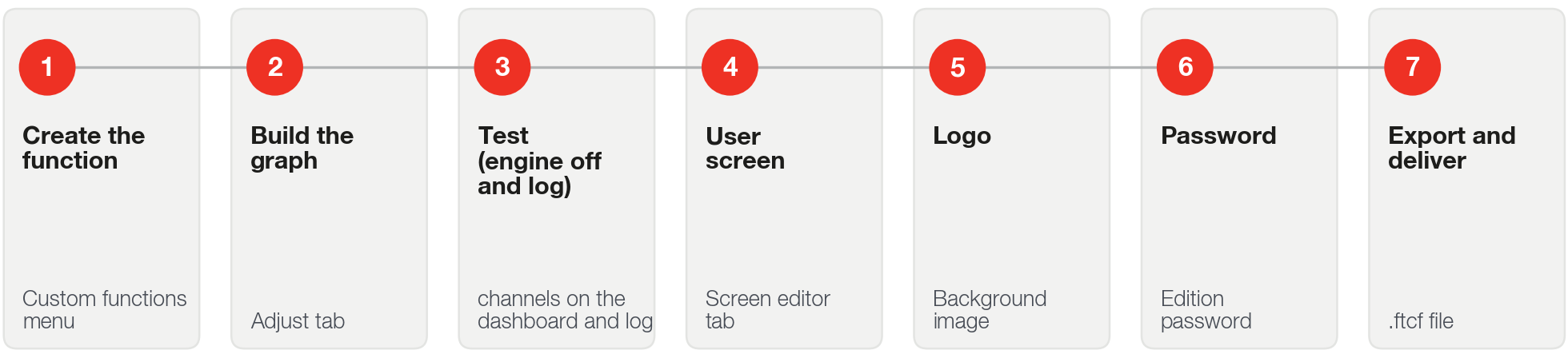
#The journey of the person creating a function
Everyone who creates a function follows the same path, from the first idea to delivery to the customer. Each step has a chapter in this guide.