7. Output blocks
The output blocks are the 7 blocks in the Outputs category of the new block menu. They are what makes the custom function take effect: write to a channel, act on the VCU or drive a physical pin.
All of them are terminal blocks: they have inputs and no output, so no link leaves them. An input with no link is 0. Each block runs on every cycle of the function, nominally 1 ms: the interval depends on the processor load.
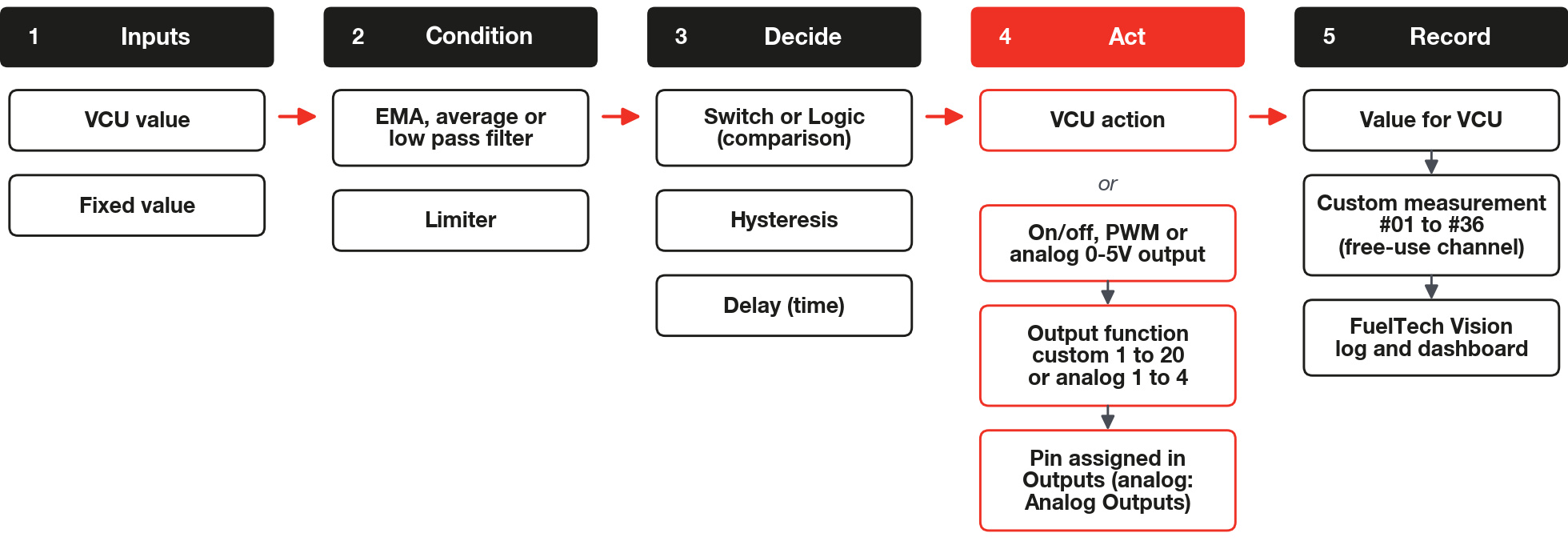
First come the four blocks that write to a channel or act on the VCU. Then come the three that drive a physical pin.
#Value for VCU
Writes the number that arrives at the input to a VCU channel, on every cycle. The free-use channels store the function's result; the list also includes common VCU channels, which other functions can read.
| Item | Description |
|---|---|
| Inputs | Value: the number to write. With no link it is 0. |
| Output | None. |
| VCU data | Channel that receives the value. The list includes channels such as buttons, temperatures, pressures and O2 sensors. Calculated measures, such as RPM and MAP, are not in the list. |
| Free-use channels | Custom measurement #01 to #36. |
The block writes the value exactly as it arrives, without converting it to the channel's type. If the channel does not yet have a source in the map (physical input or CAN), the VCU enables it and starts treating it as valid, with the custom function as the source. If it already has a source, the block only writes the value, and the physical input or the CAN can overwrite it.
Two blocks on the same channel overwrite each other: the channel keeps the value of the one that runs last in each cycle. Do not depend on that order. Use one channel per block.
On/off channels (buttons) and integer channels may take a value different from the number the block writes. Check in the log the value such a channel takes before depending on it.
If the Custom measurement is also configured on an analog input of the map, FuelTech Vision warns when you confirm: the two sources compete for the channel and the value inherits the sensor's unit (in psi, the function's value appears multiplied by 14.5038). Use another free Custom measurement.
When the VCU unloads the functions, for example when it receives a new map, the written channels go back to having no source and the last value remains. Check that the Custom measurements you use are in the log and panel channel lists.
Memory: 0 bytes of working memory (map limit of 512) and 6 bytes of configuration (limit of 2048).
#VCU action
Applies one of the actions in the list to the VCU, using the number that arrives at the input as the value.
| Item | Description |
|---|---|
| Inputs | Input: the action's value. With no link it is 0. |
| Output | None. |
| Action | Which action to apply. Default: None. |
| Minimum | Lowest applied value. The editor creates the block with 0. |
| Maximum | Highest applied value. The editor creates the block with 0. |
On every cycle the VCU limits the input between Minimum and Maximum (below the minimum it is the minimum, above the maximum it is the maximum) and hands the result to the action. The value is rewritten on every cycle, whether it changes or not.
| Action | What it does in the VCU | Unit |
|---|---|---|
| Ignition compensation | Adds the value to the advance, along with the native corrections. Positive = more advance. | degrees |
| Ignition timing | Replaces the ignition timing with the value. The map's ignition limits apply afterward. | degrees |
| Ignition cut | The value is the cut level in %: about that percentage of the ignition events is cut, chosen at random. Acts only with the engine turning. The highest level among the cuts wins. | % |
| Fuel injection compensation | Adds % to the injection of all banks (injector groups A, B and C, called Primaries, Secondaries and Tertiaries on the screen): factor 1 + sum / 100. | % |
| Injection compensation - Primaries / Secondaries / Tertiaries | Same, only in the bank indicated (three actions in the list). In VE mode (injection calculated from volumetric efficiency), a value other than 0 blocks the VE closed loop correction by the O2 sensor, like an enrichment; the global action does not block it. | % |
| Injection phase angle - Primaries / Secondaries / Tertiaries | Adds degrees to the bank's injection phase (three actions in the list). | degrees |
| Fuel injection cut | Same as Ignition cut, in the injection cut list. | % |
| Ethanol override (Flex Fuel) | Replaces the ethanol % of the sensor, limited to 0 to 100. | % |
| O2 closed loop target override | Replaces the lambda closed loop target of the time-based mode. No effect in VE mode. Turns on only with the input greater than 0. | lambda |
| ETC compensation | Adds percentage points to the throttle opening target. The resulting target stays between 0 and 100. | % |
| ETC opening limit | Scales the opening target: target × value / 100. | % |
| Torque target override (EV) | Replaces the electric motor's torque target. The pedal no longer commands it and a pedal failure does not cut traction (see the priorities below). | % |
| Torque target compensation (EV) | Multiplies the torque target: torque × (1 + sum / 100). Result between 0 and 100. | % |
| None | Does nothing. Uses the same memory as the other actions. | none |
The compensation actions add to the native calculation, and several blocks of the same compensation add up. The replacement actions (Ignition timing, ETC opening limit, Ethanol override (Flex Fuel), O2 closed loop target override and Torque target override (EV)) compete with the native functions by priority.
The priority is fixed: the block has no field for it. The highest priority wins and, in a tie, the first one installed.
- Ignition timing loses to 3-step, 2-step, burnout and gear shift. It beats the hard cut, the native rev limiter, only in the fixed ignition timing that the hard cut can apply above its cut RPM: the limiter's cut keeps acting in the cut list, where the highest level wins. It ties with anti-lag.
- ETC opening limit loses to boost control by ETC, to Time based compensations, a native function of the Drag Race Features menu, and to Push to Pass (P2P), a native function triggered by a button. It beats jet ski control.
- O2 closed loop target override beats Time based compensations and the target calculated by the map.
- Torque target override (EV) follows the same rule among torque target requests. The two torque actions do not act when the system forces zero torque (neutral N, park P or clutch in EV mode), and the safety limits of the electrical system (current, battery charge and protections) apply after them. With Torque target override (EV) in the VCU, the torque target no longer comes from the pedal, whatever value reaches the block. With a value above 1%, the motor receives that torque even with the pedal released or the brake pressed, and even above the reverse-gear torque limit; regeneration does not act. With a value of 1% or less, the pedal does not accelerate. A pedal sensor failure does not cut traction (the failure warning still appears). The VCU enters Ready (the ready-to-drive state) even with the pedal pressed or with an invalid pedal reading, and the override torque reaches the motor as soon as you select D or R. After restarting the VCU, check in the log that the override is acting before driving; while a map is being written, the last value stays applied. Test the behavior after writing and after restarting the VCU.
Use only one block per replacement action: with two, the first one installed applies and the other is ignored, with no warning.
In most actions, the action stays active the whole time the function runs, whatever the value. Only Ignition cut and Fuel injection cut (value already limited by Minimum and Maximum) and O2 closed loop target override (input value) turn on with a positive value. With Minimum greater than 0, the cuts stay on all the time.
To turn an action off, delete the block or disable the function, which gives the memory back. None also turns the action off, but the block keeps using memory.
Memory: 32 bytes of working memory (map limit of 512) and 16 bytes of configuration (limit of 2048).
#Action per cylinder
Applies a compensation to one cylinder or to all of them. It works like the VCU action, with one more field for the cylinder.
| Item | Description |
|---|---|
| Inputs | Input: the compensation value. With no link it is 0. |
| Output | None. |
| Action | None, Ignition compensation (degrees) or Injection compensation - Primaries, Secondaries or Tertiaries (%). |
| Cylinder (0 = all) | Cylinder number, from 0 to 16. With 0, the action applies to all. |
| Minimum and Maximum | Limits of the value, as in the VCU action. The editor creates the block with 0 in both. |
On every cycle the VCU hands the value to the chosen cylinder (or to all of them, with 0) and 0 to the others. In ignition, the value adds degrees to the cylinder's adjustment. In injection, it adds % to the cylinder's adjustment in the indicated bank. The editor's help text asks for one block per cylinder.
The per-cylinder injection compensation only acts when the bank has one injection output configured for each engine cylinder. Otherwise, the block has no effect.
Ignition uses the cylinder number of the ignition channel, starting at 1. Injection uses the cylinder number of the injection angle table. Before using it, confirm in a test which cylinder responds to the chosen number.
Memory: 24 bytes of working memory (map limit of 512) and 16 bytes of configuration (limit of 2048).
#High resolution ignition cut
Cuts the ignition of a fraction of the cylinders by delaying their ignition timing. It does not cut the spark.
| Item | Description |
|---|---|
| Inputs | Percent: fraction of the cylinders affected, in %. Retard: timing delay, in degrees. With no link they are 0. |
| Output | None. |
| Percentage (min / max) | Limits of the percentage, in %. Default: 0 and 100. |
| Retard - degrees (min / max) | Limits of the retard, in degrees. Default: -50 and 0. |
On every cycle the VCU limits the percentage and the retard to the block's ranges. The block only acts with a percentage greater than 0. A negative retard delays the timing.
In ignition, among all the sources (traction control, 2-step, 3-step, burnout and custom functions) the one with the highest percentage wins; in a tie, the first. The winner's retard is limited by the firmware to -64 to 0 degrees, whatever the block's range.
Every cycle, each cylinder is selected at random with a probability equal to the percentage, and the selected ones receive the retard in the cylinder's adjustment. With retard 0 no cylinder is retarded. Since the source with the highest percentage wins, a block with a high percentage and retard 0 also cancels the retard requested by the sources with a lower percentage, such as traction control and the launch functions.
Memory: 16 bytes of working memory (map limit of 512) and 22 bytes of configuration (limit of 2048).
#On/off output
Turns a physical VCU pin on or off according to the input. The block does not choose the pin: it chooses an output function, and the pin receives that function on the Outputs screen.
| Item | Description |
|---|---|
| Inputs | Input: turns on with a value greater than 0, turns off with 0 or less. With no link it is 0 (off). |
| Output | None. |
| Output field | The block's output function: None (default) or Custom function #1 output to Custom function #20 output. |
On every cycle the block turns the pin on if the input is greater than 0 and turns it off otherwise. There is no hysteresis: if the input oscillates around 0, the output oscillates with it. To avoid this, place a Hysteresis block before it. The block has no option to invert the output.
A pin has a single function and a function sits on only one pin: assigning the same function to another pin moves the assignment away from the previous pin. The screen offers the function on any pin A (injection), B (ignition) or C (half bridge: connects the load to positive or to negative, that is, ground) of the FT700. The electrical characteristics of each pin type are in the installation manual of your VCU (FT700 or FT470): check them before connecting a load.
While the pin is forced by an output test, the function's writes are ignored. When the functions are unloaded (new map, function disabled), the pin is turned off.
Memory: 8 bytes of working memory (map limit of 512) and 6 bytes of configuration (limit of 2048).
#PWM output
Generates a PWM signal on a physical pin, with frequency and duty (the fraction of the time the output stays on) coming from two inputs. The pin assignment is the same as for the On/off output: without it the block does nothing and gives no warning.
| Item | Description |
|---|---|
| Inputs | Frequency: in Hz. With no link it is 0, which the VCU treats as 4 Hz. Duty: in %. With no link it is 0. |
| Output | None. |
| Output field | The block's output function: None (default) or Custom function #1 output to #20, the same list as the On/off output. |
The duty is limited to 0 to 100% and applied in steps of 0.01%. A negative frequency is 0 and a fractional one is truncated to whole Hz. The VCU accepts from 4 Hz to 100 kHz: on pins A, B and C, a frequency below 4 Hz, including 0, becomes 4 Hz.
The VCU reconfigures the channel whenever the frequency changes; changing only the duty is applied directly. If the frequency does not need to vary, connect Frequency to a Fixed value block.
When the functions are unloaded (new map, function disabled), the pin goes back to being a regular output at low level. Duty 0 keeps the PWM configured at 0%. The block has no option to invert the output.
Memory: 8 bytes of working memory (map limit of 512) and 8 bytes of configuration (limit of 2048).
#Analog output 0-5V
Generates a voltage of 0 to 5 V on one of the four analog output pins (the screen shows the block name as Analog output #0-5V). The block chooses one of four output functions, and the pin receives that function on the Analog Outputs screen.
| Item | Description |
|---|---|
| Inputs | Voltage: the desired voltage, in V. With no link it is 0. |
| Output | None. |
| Output field | The block's output function: None (default) or Analog output #1 to #4. |
On every cycle the VCU limits the voltage to 0 to 5 V. When the functions are unloaded (new map, function disabled), the output goes to 0 V.
Memory: 8 bytes of working memory (map limit of 512) and 6 bytes of configuration (limit of 2048).